- Portfolio ▼
- | Blog
- | Affiliate discounts
- | Guestbook
- | Info
- | Contact
Aurora HDR 2019As you know I am using Luminar software as my photo editing app. Skylum is the company behind Luminar. I really like Luminar. Skylum has now also updated Aurora HDR (high dynamic range - blending bracketed images of different exposures together to retain the best exposure in the bright and dark parts of each image thereby stretching your dynamic range) to the 2019 version. Let it be said that up until now I did not like HDR software. I used luminosity masks to blend my images and with Sony's wonderful dynamic range I find that I really do not even need to blend many images. The reason for my dislike of HDR software is primarily the gray look often present in the clouds in HDRed images. I just did not like the look of HDR, period. Since I am an affiliate of Skylum I decided to give the Aurora HDR 2019 software a test drive. First of all, I like how the program is so similar to Luminar. If you know the one you can basically work the other one. I like the simplicity that Skylum software is known for. I also really like the results. Let's talk about an image:
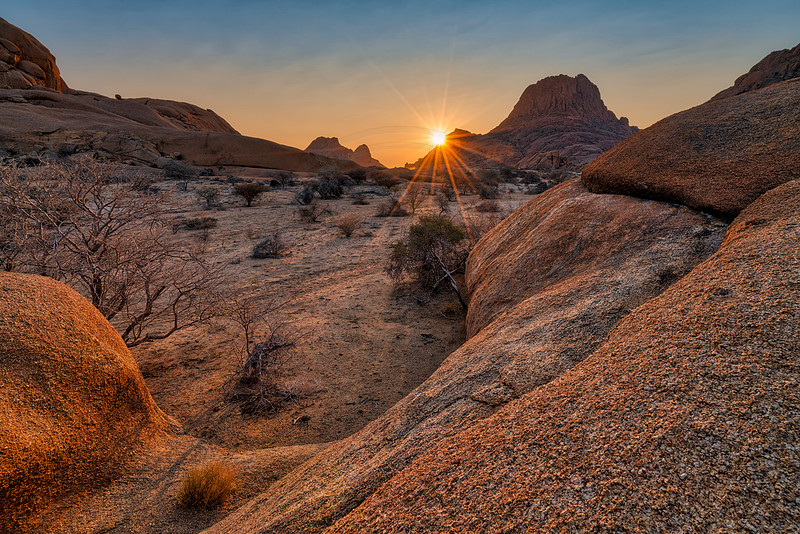
This is a difficult image to shoot in terms of exposure. The rocks (hills) in the background have parts that were in deep shade - black). But then you are also shooting right into the sun. Typically, the difference between the black shadows and the bright sun is too much for the camera to deal with so you either have to settle for a nice sun but black shadows or nice shadows with a blown sun. I bracketed three images to make sure that the sun is not blown and the shadows are not pitch black. I then developed just one exposure as I usually would. Believe it or not, one exposure was all I needed. Yes, the sun was blown a bit and the shadows were black. In post-processing, I was able to correct both and nothing was clipped any more. However, the sky was just whiteish. Then I took all three exposures and processed them with Aurora HDR 2019. I did not change any settings. Once done I processed the file as usual with Luminar. The image was a lot better than the single exposure. Judge for yourself. Now, if I may complain! I checked "remove chromatic aberration" but it just did not do a good job at all. This image had rather terrible chromatic aberration. This added a lot of work. I had to open the images in PhotoShop to remove the chromatic aberration there, save each file as a tiff and then open them in Aurora. I wish they would work on this aspect of the program a bit. However, I really like how the program dealt with the HDR side of things. The price is also right. So overall I can recommend the program. You can get a discount by buying the software from my link (click on "affiliate links" on the menu bar). As I have mentioned, I am an affiliate which means that I also get a small incentive. Comments
No comments posted.
Loading...
|
Subscribe
RSS
Archive
January
February
March
April
May
June
July
August
September
October
November
December
|