- Portfolio ▼
- | Blog
- | Affiliate discounts
- | Guestbook
- | Info
- | Contact
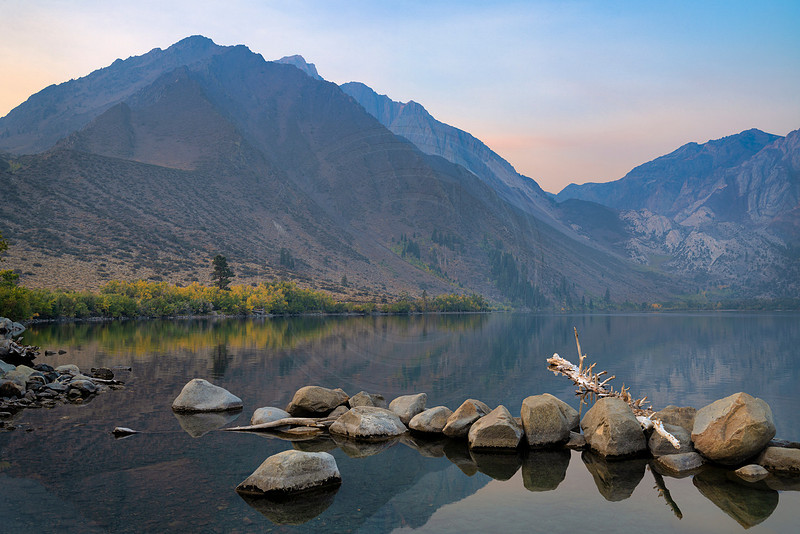
Clearance spaceHumans have two eyes. That gives us the ability to see and to measure depth and distance. We can see when something is closer to us than something else even though they are visually touching. When we look at a 2-D scene such as a computer screen or a print we kind of lose that ability because the image has been capture with one "eye" (lens and sensor) rather than two. So when two things touch one another they either get lost in the other or our sense of distance is lessened.
Leaving a bit of distance between such elements in the scene creates space, separation, and distance. You can see that I also left a gap between the tall tree on the left and its shadow which gets close to the rock on the left of the line of rocks. These are small things but they make a big difference. They make an image look clean and neat. So how do we control these gaps? We can't move the log or change the size of the lake. You may remember from last week that I mentioned that we can control the relative position between elements in the scene by changing our position. These gaps are controlled by moving up or down. The lower angle we shoot from the smaller the distance between the line of rocks and the waterline at the base of the mountain. The higher we go the more we increase this distance/space. By moving up or down we can fully control whether these elements touch each other or not. Before you trigger your shutter have another look to make sure that each element meant to be separate is in fact separate and not touching. Comments
No comments posted.
Loading...
|
Subscribe
RSS
Archive
January
February
March
April
May
June
July
August
September
October
November
December
|