- Portfolio ▼
- | Blog
- | Affiliate discounts
- | Guestbook
- | Info
- | Contact
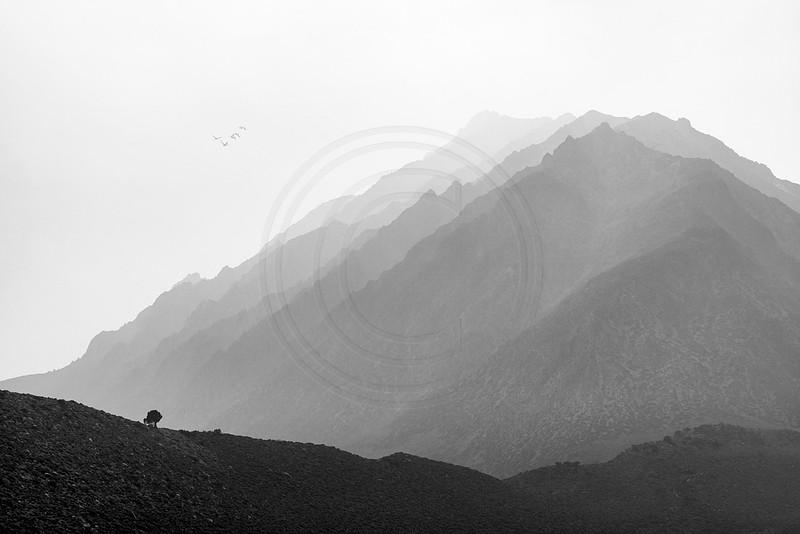
Balancing elementsBalance is important in composing nice photographs. Having too many elements on one side of the photograph without something on the other side of the photograph to bring balance can make the one side feel too heavy. Visual weight is determined by size and distance. Closer elements weigh more visually than objects far in the distance. Hence a small object nearby can bring balance to a larger object in the distance. Balance in photography can be a strange thing to describe for non-photographers. They often find it hard to put their finger on it but they know that there is something wrong with the image.
Keeping all of this in mind we can place elements in our photographs to bring about a balanced scene. At times we need to move objects to the right position to create the needed balance. No, I am not talking about moving objects around in Photoshop. The photographer can move his or her position which in turn rearranges the elements in the scene. When we move around, closer elements' position change much more relative to elements far away. Do an experiment right now. Look at your computer screen and notice the position of an object on the other side of the room, such as a light switch or a door, or a piece of furniture. Now, move your head left and then right while noticing how much your computer screen's position move in relation to the other object you are also keeping an eye on. By walking to the left or the to the right the photographer can literally move the position of that tree in the foreground relative to the mountain. So don't just plonk down your tripod and shoot right where you are at. Think where in the image you would like that tree to be to bring balance to the image. Then move the tree by taking up a position that has the tree where you want it to be. The closer you are to the tree the more it will move relative to your walking around. We don't only have the ability to move the tree to the left or to the right but we can also change the perspective of the tree vertically. The closer we are to the tree the more it will reach up into the sky or background. The further away we are from the tree the more its height will shrink relative to its background. So don't just accept what nature gives you where you are at. Think about how the image will look the best. Then change your position to get that perspective. Always be safe. Cliffs, water, animals, and such may not make it safe to position ourselves where we would ideally want to be. No image is worth your life. Move around to get the image you want only if it is safe to do so. Comments
No comments posted.
Loading...
|
Subscribe
RSS
Archive
January
February
March
April
May
June
July
August
September
October
November
December
|