- Portfolio ▼
- | Blog
- | Affiliate discounts
- | Guestbook
- | Info
- | Contact
Correcting DistortionLandscape photographers often like to use very wide angle lenses. Most of the time we do so to exaggerate something in the foreground. From time to time we do so because it is necessary due to the size of what we are shooting.
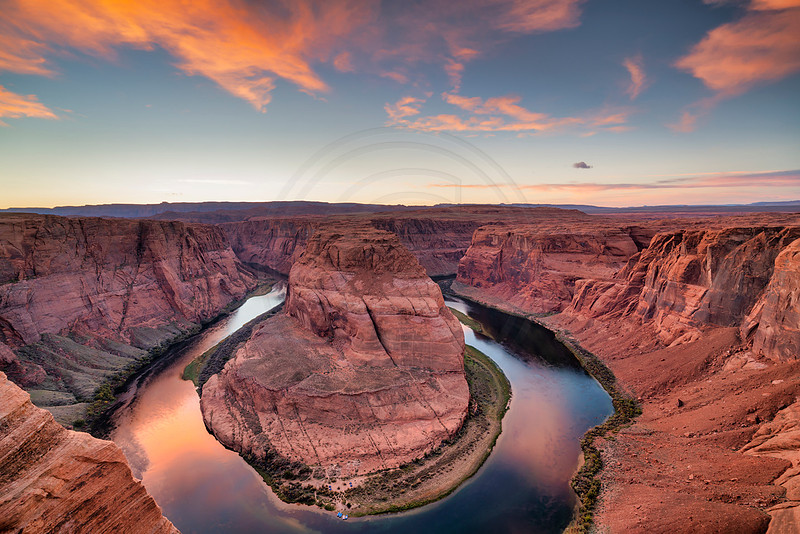
This is Horseshoe Bend near Page, Arizona. This scene cannot be photographed from the ground without using a really wide angle lens (yes, I know about panoramic photography - I am just talking about with one shot here). It may seem as if you have a lot of distance to play with but you don't, it is only the wide angle lens that makes it look that way. While wide angle lenses do make it possible to include the whole scene they also create other problems. Yes, we spoke about photography being all about tradeoffs last week. Well, here is another tradeoff. The wider the lens the more perspective distortion we get. Horizons bend. Trees lean and buildings are falling over backwards. So how do we fix those issues? Raw image developers (software) will know what lens was used and make corrections accordingly. However, it is just not possible for those auto corrections to restore everything. In this image I had issues with my horizon. I am going to share a quick and easy fix with you. Open the image in Photoshop. Make the images a bit smaller because you need space around the image. Well, don't make the image physically smaller just view it smaller (Control or Command and -). Select the whole image (Control or Command and A). Click on edit, transform, distort. Now place your mouse on one of the corners, click and hold. Now drag up. Use this technique to easily and quickly fix bending horizons. You can move your corners to the side as well to correct buildings falling over backwards too. This is a wonderful little trick. Oh, by the way. You have to do each side independently (not all at once). There you go, try it. Comments
No comments posted.
Loading...
|
Subscribe
RSS
Archive
January
February
March
April
May
June
July
August
September
October
November
December
|