- Portfolio ▼
- | Blog
- | Affiliate discounts
- | Guestbook
- | Info
- | Contact
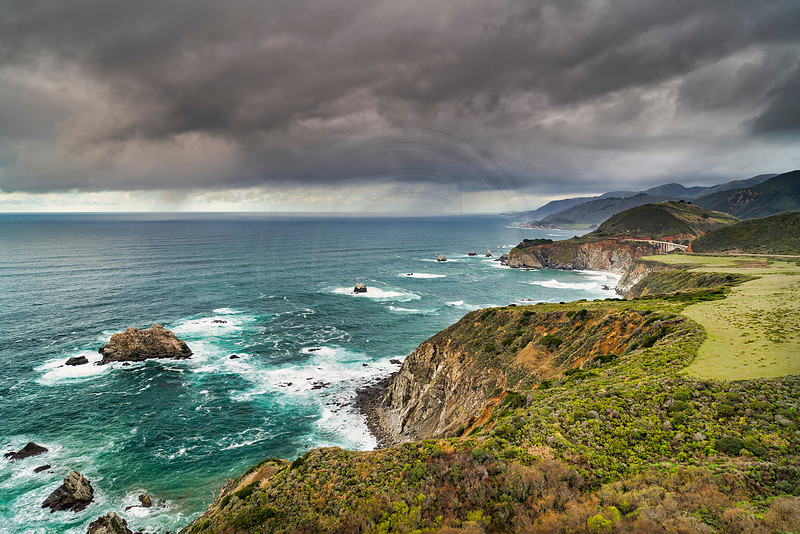
Light, mood and white balanceOn a recent workshop at Big Sur, California we visited the same location on two different days. We encountered very different conditions on each day. I made basically the same image composition wise. However, because of the conditions the light and mood of the two images are very different. Here is the first image from the first day we visited this location:
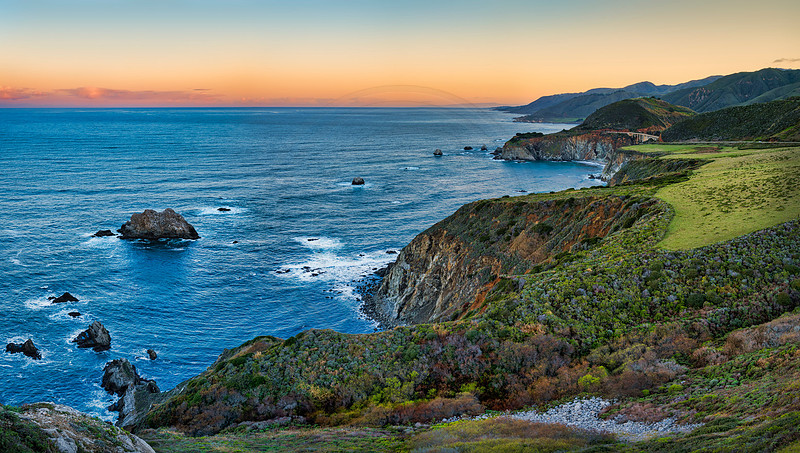
It was rainy and threatening. The white balance is fairly warm. The ocean's color looks very nice. Obviously the next image's sky will change rather dramatically. What I would like you to notice however is the color shift in the coastline and the plants/grass on the right. Compare these two images:
Yes, the color of the ocean is very different too, but that is simply due to the time of day and the direction of the light. In the first image light is shining on the water revealing its color. In the second image the sun is long gone, so there is no direct light on the ocean. The white balance on the coastline and the plants/grass on the right is much cooler in the second image. Now compare the mood between the two images. Take a minute, I will wait for you ... Even though the composition is very similar we have two very different images due to light and mood. The mood between these two image are radically different. This is an illustration that the same scene, even the same composition can yield very different images. This is why it is a good idea to go back to the same scene when conditions change. Do not be tempted to say, "oh, I have already been there." This comparison also shows you the big difference white balance settings can make. Play with your white balance to tweak the image. Sometimes I use dual white balance settings. In the second image I warmed up the sky to bring out the orange glow, but because the sun was down the water was colder (color temperature). I did not want to warm up the water. It would just not look right in this image. Therefore, I actually cooled down everything below the horizon as bit. This image thus makes use of two different white balance settings. There are many ways of achieving this effect. I will only mention two here. When I "develop" my raw file I do not touch white balance at first. Once the file is open in PhotoShop I duplicate the layer. You can now take each layer back into the raw developer and change their white balances; one layer for the sky and another for everything else. Once back in PhotoShop you simply place a layer mask on your top layer and paint out where you want to see the background layer's white balance. This is easy to do but a bit more work than I care to do, not that I am lazy, I just have too much to do to waste time if there are more efficient ways of doing things. The method I prefer to use is a split filter in Skylum's Luminar (click on affiliate links for a discount). With this filter you simply slide two sliders; one to change the warmth of warm tones and one to change the warmth of cold tones. This effect is like stretching your warmth dynamic range (if you understand what I mean). You can make your warms warmer and your cools cooler with no masking or duplicate processes. You simply slide two sliders and you are done. I love what that filter does to my images. Of course it works best with an image that has both warm and cold tones. Light and white balance can dramatically impact the mood of your images. Many photographers these days seem to have forgotten to play with white balance because the newer cameras do such a good job with auto white balance. Do not fall into that trap. Take control of the mood of your images. Comments
No comments posted.
Loading...
|
Subscribe
RSS
Archive
January
February
March
April
May
June
July
August
September
October
November
December
|