- Portfolio ▼
- | Blog
- | Affiliate discounts
- | Guestbook
- | Info
- | Contact
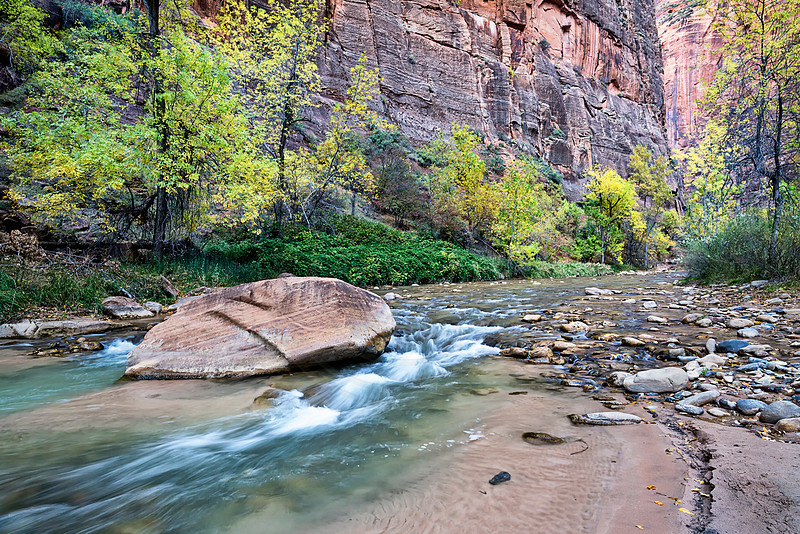
Using multiple lead-in linesLast week we looked at S-curves to lead the viewer into the image. This week we are looking at using multiple lead-in lines. Railway tracks can often be used as a lead-in line. I state "a lead-in line," singular, because the two tracks form a unit to act as one line. They make one line together. In nature we often find multiple lead-in lines. Perhaps there are multiple lines of rocks leading into the image, or tracks or plants growing in rows. As you have noticed, we are visiting Zion National Park lately.
In post processing we need to make sure these lines are prominent. I brightened the main river lead-in line somewhat. I darkened the small river bank line. Things do not always need to be brighter. The key is that it should stand out. It just needs to be different from the surroundings. In the case of the river bank, it was darker already, so I darkened it even more (just a bit), to help it stand out more. The river-line on the far left is also darker than the sand on either side of it, so making it brighter is not going to help as it will then just blend in better with the sand. I don't want it to blend in because then I loose the line it makes. So I darkened it a little to make it stand out from the sand, thus forming a more defined line. Once again, look for and use lines in your landscape images. In post processing, work those lines so that they can better do what they are intended to do: lead the viewer into your image. Comments
No comments posted.
Loading...
|
Subscribe
RSS
Archive
January
February
March
April
May
June
July
August
September
October
November
December
|