- Portfolio ▼
- | Blog
- | Affiliate discounts
- | Guestbook
- | Info
- | Contact
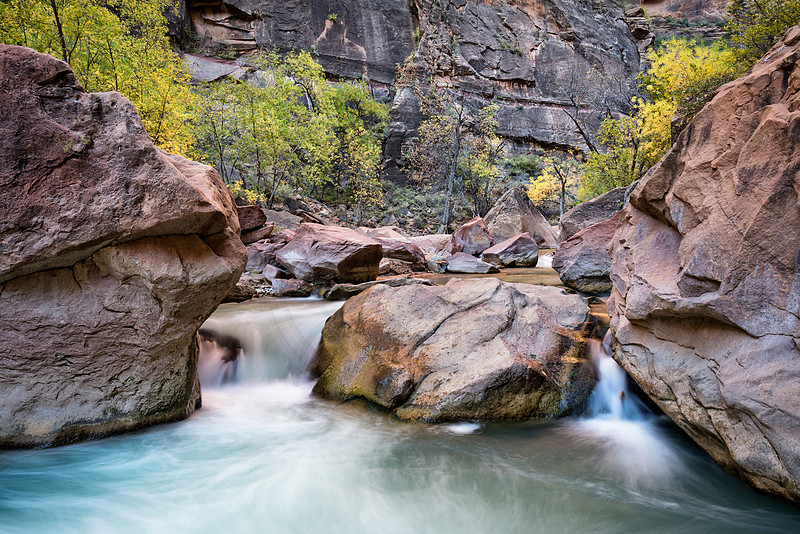
Movement and blending multiple imagesWhenever there is movement the photographer always aught to ask him or herself whether or not he or she wants to show that movement or freeze that movement. Photography 101 teaches us to use a slow shutter speed to show the movement because whatever is moving will be blurred thereby given the human brain the notion of movement. Photography 101 teaches us to use a fast shutter speed to freeze motion. So in many circumstances the choice is simple; if there is movement and you want to show it use a slow shutter speed or use a fast shutter speed if you want to freeze the movement or action. Life, however, is not always that simple. What do you do when there is movement in your image and you want to show some of the movement but freeze other parts of the movement? When shooting a moving bicycle you can show movement by using the panning technique. When shooting a prop driven airplane you can choose a medium shutter speed because the props are moving much, much faster than the pane. A medium shutter speed is fast enough to freeze the plane but still show the movement of the props. But what if things are moving at about the same speed and you want to freeze some movement AND show other movement in the same image? Let's look at an image. The water was obviously flowing and I wanted to show that water movement. So naturally I needed to use a slow shutter speed. However, the wind was howling (I mostly hate wind when I shoot landscapes). The wind was howling so badly that the trees were shaking. Shaking trees and slow shutter speeds typically do not go together (there are exceptions, like wanting to show a major storm), because you end up with out of focus trees (branches and leaves). So I needed a fast shutter speed to freeze the branches and leaves; to get them sharp and in focus. Well you really cannot use a slow and fast shutter speed in the same shot.
Now you have two images to blend in post processing. Please do not wait for the post processing process to begin before thinking about that process. You need to be considering things for the processing process while at the scene composing your image. You need to make sure that you have things that are not moving between the moving water and the moving trees so that you have a clear path to blend your images well. You do not want moving leaves and branches in front of moving water because how then will you freeze one and show the movement of the other? So I positioned myself in such a way that there are rocks (not moving) between the water and the trees. You need to make sure that your tripod is rock solid and that it does not move between exposures because you will need to line things up in post and how are you going to line things up if the same object is in two different places in the two different images? In post you simply place the images in two layers. Using a mask you now delete the moving parts you want sharp. In this case. I deleted the moving leaves and branches to show the sharps ones from the second exposure with the faster shutter speed. In this way I kept the moving water AND the sharp leaves and branches. Since the rocks were not moving they were used as the buffer between the water and the trees for deleting / masking purposes. There you have it. Shoot multiple images using different shutter speeds and blend them together. Comments
No comments posted.
Loading...
|
Subscribe
RSS
Archive
January
February
March
April
May
June
July
August
September
October
November
December
|